

Introduction
This started as a quick check, not a full comparison. I wasn’t planning to write an article on Booksy alternatives. Then I came across this Reddit thread from working barbers, and it caught my attention. Different people, different setups, but the same concerns kept coming up again and again in the comments. That’s usually a signal something deeper is going on.
So I decided to look into it properly. I started by going through Booksy’s pricing page to understand how the plans are structured. Then I dug into the details most people skip, like the official explanation of how Boost fees actually work, because that’s where the real cost differences show up.
From there, I didn’t want to rely on just what’s written or what people say. I signed up for trials, set up real booking scenarios, and tested the full flow end to end.
So this guide is based on what actually happens when you use these tools day to day, not just surface-level comparisons or opinions.
Booksy Alternatives we selected for this study

Lunacal

Vagaro
Fresha
Square appointments
Mindbody
Best Booksy alternatives at a glance
Quick fit by business type
| Business type | Best tool | Why it fits |
|---|---|---|
| Solo service provider | Lunacal | Clean booking pages, low cost, strong branding control |
| Small salon team | Vagaro | Staff scheduling, payments, and website builder in one |
| Marketplace-driven salons | Fresha | Built-in discovery and client acquisition |
| POS-first businesses | Square Appointments | Payments, POS, and scheduling tightly connected |
| Fitness studios with memberships | Mindbody | Handles classes, memberships, and recurring billing |
Feature and pricing comparison
| Feature | Lunacal | Vagaro | Fresha | Square | Mindbody |
|---|---|---|---|---|---|
| G2 Rating | 4.9 | 4.6 | 4.2 | 4.6 | 3.7 |
| Starting price | $9/mo | $23.99/mo | $0 | $0 | $99/mo |
| Free plan | No | No | Yes | Yes | No |
| Marketplace traffic | No | Optional | Yes | No | Yes |
| Custom branding | Strong | Medium | Limited | Limited | Limited |
| Payments | Stripe, PayPal | Built-in | Built-in | Built-in | Built-in |
| Team scheduling | Yes | Yes | Yes | Yes | Yes |
| Packages/memberships | Yes | Yes | Yes | Partial | Strong |
| POS system | No | Partial | Yes | Strong | Yes |
| Best for classes | Basic | Good | Good | Limited | Strong |
In-depth review of all alternatives
Lunacal
Lunacal is a Booksy alternative designed to increase bookings with content-rich pages, payments, reminders, and flexible scheduling workflows. Among Booksy alternatives, Lunacal is rated 4.9/5 on G2 and is one of the highest-rated tools in this category.
Features
- Drag and drop booking page editor
This is how you build your page. It is simple and visual. You add blocks like text, images, videos, and testimonials. Then arrange them the way you want. You do not need any technical skills. It feels similar to putting together a social media post. This is one reason many people look at Booksy Alternatives like Lunacal. You are not working inside a fixed template. You have full control over how your page looks.
- Beautiful scheduling pages with rich content
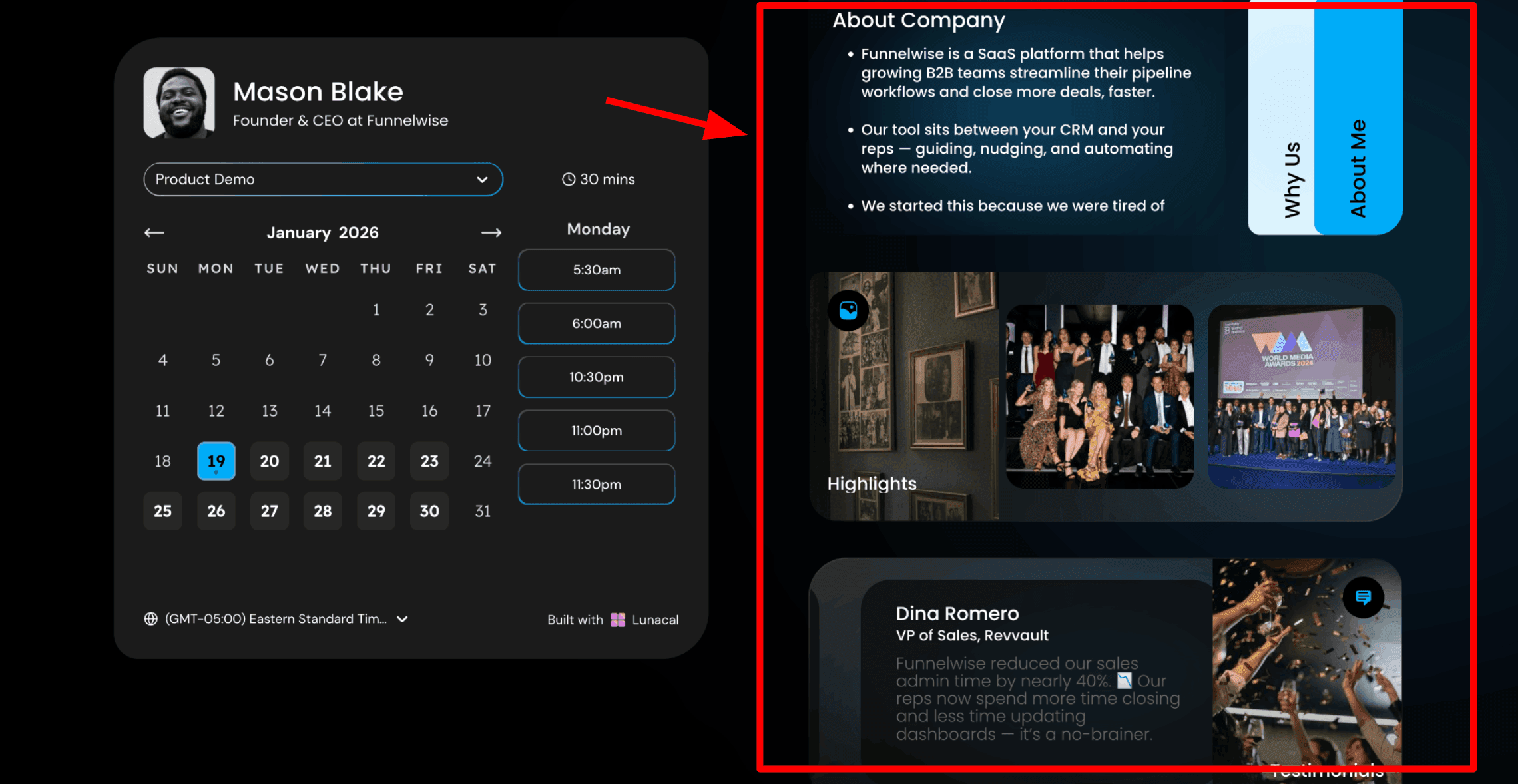
This is usually the first thing I show beauty and wellness professionals who are exploring Booksy Alternatives. The difference is very easy to see. With Lunacal, your booking page feels more like your own space. You can add content next to the calendar so clients understand your work while they are picking a time. This helps people feel more confident before they book. They get a sense of your style, your experience, and the kind of results you deliver. For professionals who want higher-value clients, this matters. People are not booking blindly. They are choosing you with more clarity. Here is how you can include content in your booking page:
- Paid events
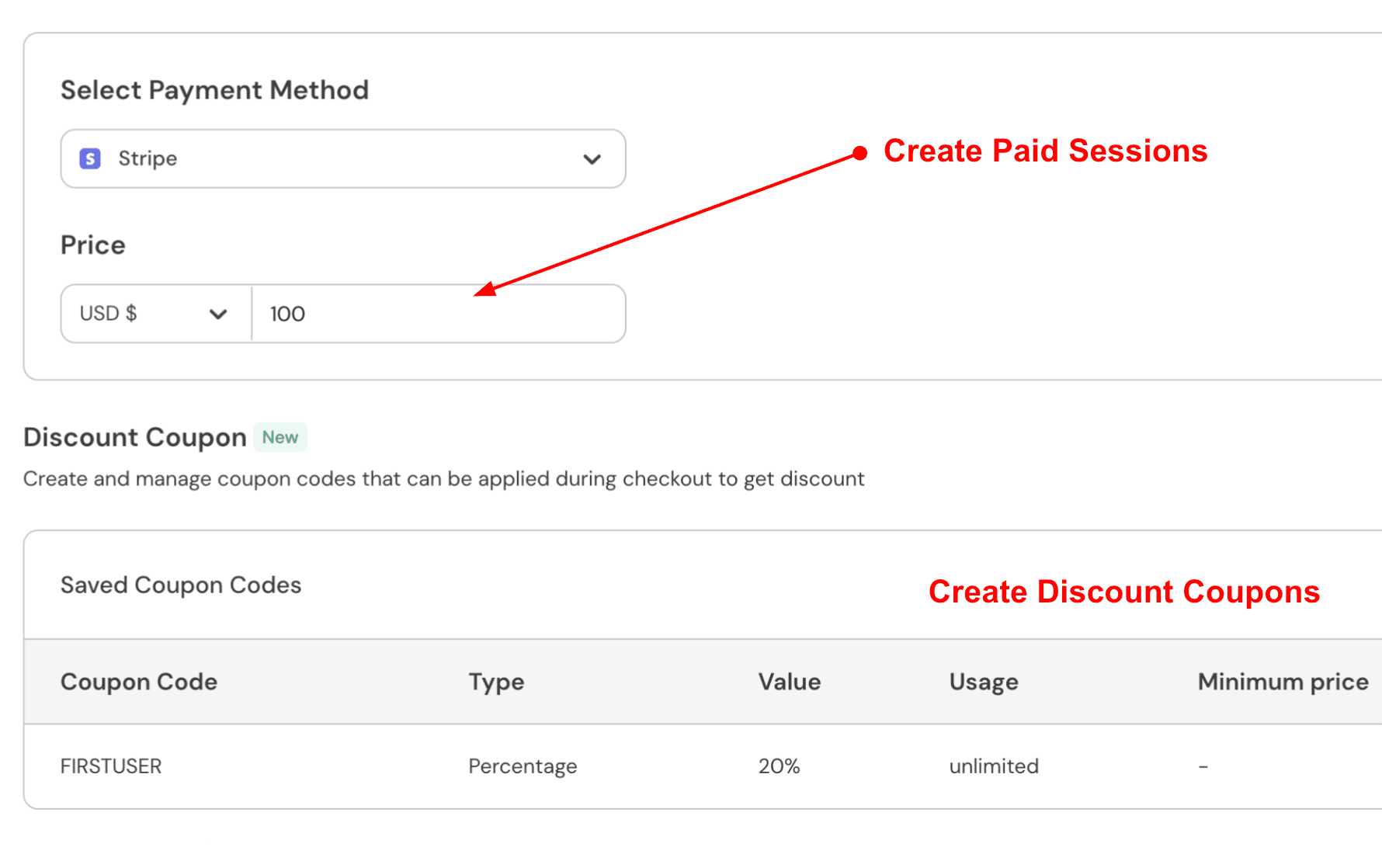
You can connect Stripe or PayPal and collect payments during booking. This keeps things simple. Clients pay upfront or leave a deposit. It also reduces last-minute cancellations. For a full colour service, I would take a partial deposit when the client books. For shorter services, I would take full payment in advance. Here is how to do it:
- Routing forms
You can collect answers first and route people to the right event, teammate, or link. This feels closer to a lightweight qualification flow than a salon marketplace flow. I found it useful for services where the first booking depends on a few questions.
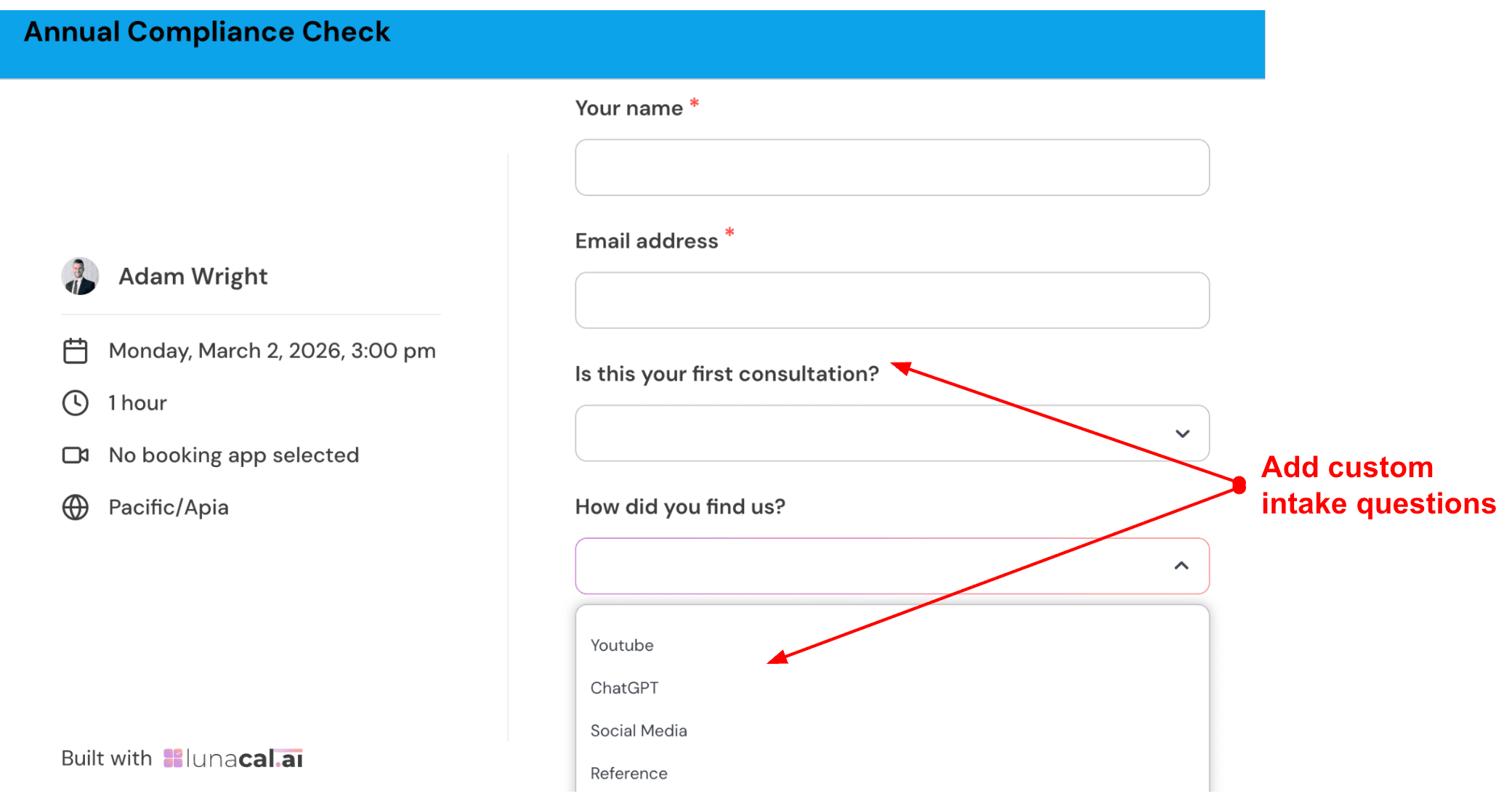
- Custom pre-appointment questions
You can ask clients a few questions before they confirm their booking. This helps you prepare properly and saves time during the session. Keep it simple. Around three questions is enough.
- Multi-staff salon scheduling flow
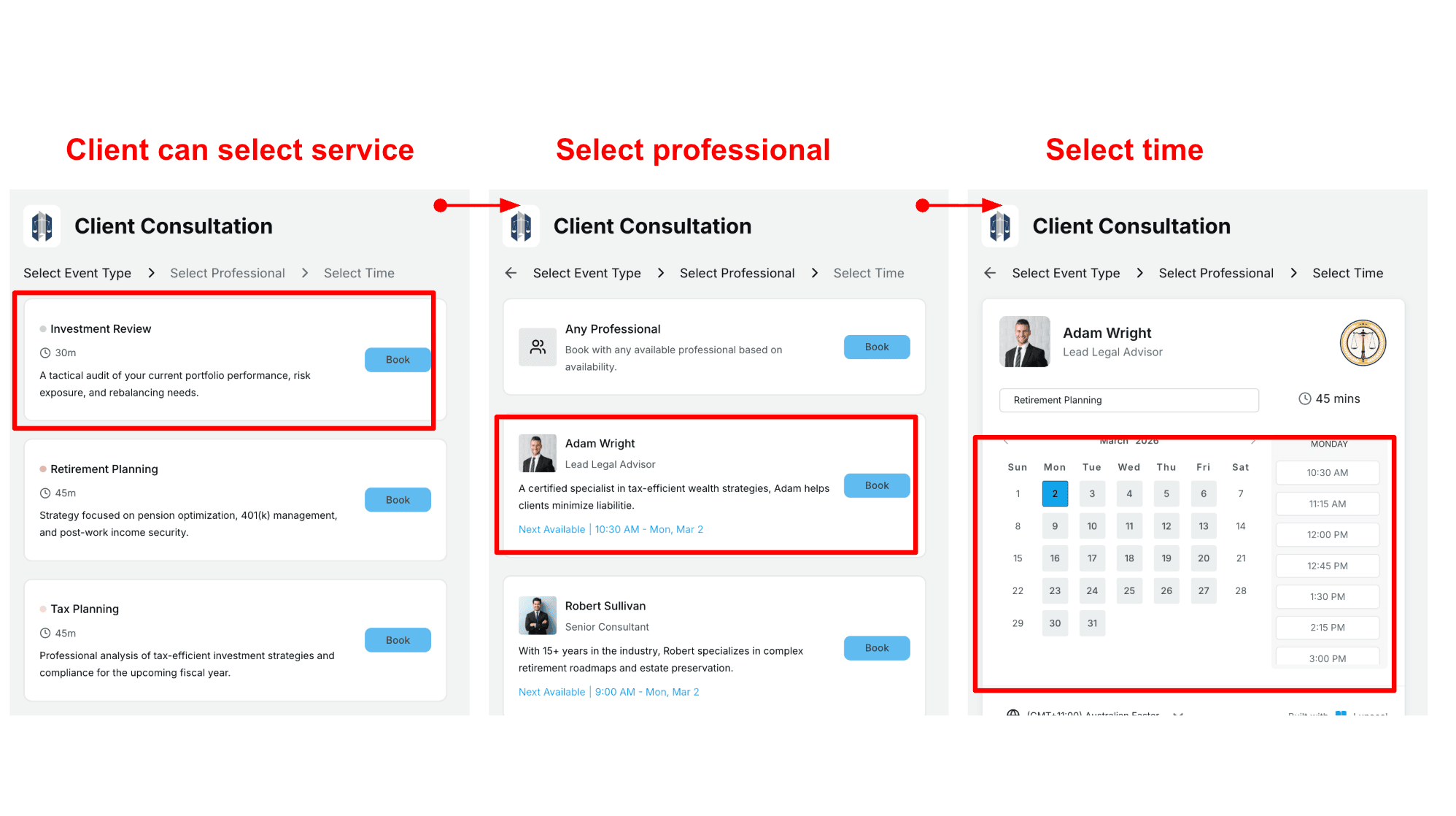
This works well for teams. Clients choose a service, then pick a specific staff member or choose any available one. It keeps scheduling smoothly and fills open slots faster. This is one area where Lunacal stands out among Booksy Alternatives for salons and clinics. For a colour appointment, I would ask about the current hair condition. Then ask if they had any chemical treatments recently. Finally, ask what result they are looking for or let them share a reference photo. Here is how to set up scheduling flow:
Pros
- Strong booking page control, especially if you want custom domains and a more premium first impression.
This is the main reason I’d pick it over Booksy. - Payments can sit inside the booking flow via Stripe/PayPal.
- Useful for service businesses that sell packages or structured offers.
- Works well when you bring your own demand from ads, content, or referrals.
- Support can be fast when you’re mid-setup, based on real user reports and what I saw.
Cons
- If your growth depends on marketplace discovery, Lunacal won’t replace Booksy’s consumer demand engine and paid promotion options.
Also, Booksy’s scale matters here, and Business Wire notes it powers hundreds of millions of appointments each year. Source: Business Wire release. - Time zone presentation could be more glanceable for some teams (you’ll see why in the Reddit screenshot below).
- If you want built-in SMS marketing allowances like Booksy includes, you may need extra tools.
- Teams that need beauty-specific operational defaults may spend more time configuring.
- If you need a marketplace profile + listing strategy, Lunacal is a different playbook.
Pricing
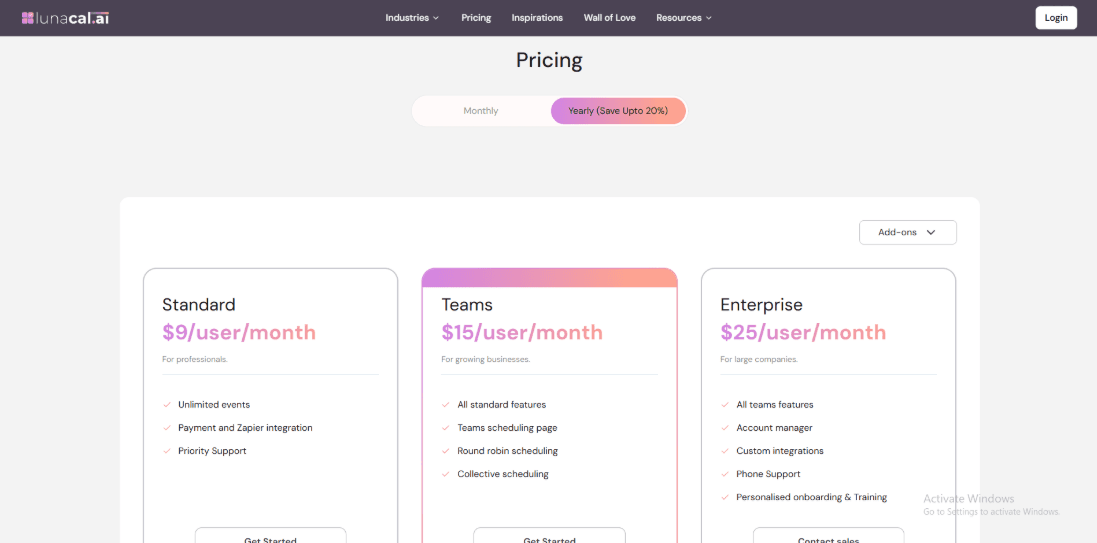
- Lunacal is priced per user, with a Standard plan listed at $9/user/month and a Teams plan at $15/user/month.
- They also show yearly billing with savings (up to 20%) and mention add-ons depending on what you need.
- For the exact, current plan details and what’s included today, use the official page: pricing page
When to Choose Lunacal
If you win business from your website, referrals, or outbound, Lunacal is a better fit because the booking page can carry proof, context, and payments. If you care about brand control and want bookings to feel like a mini landing page, choose Lunacal. If you need marketplace discovery and want a demand engine attached to your booking tool, Booksy will usually make more sense.
Vagaro
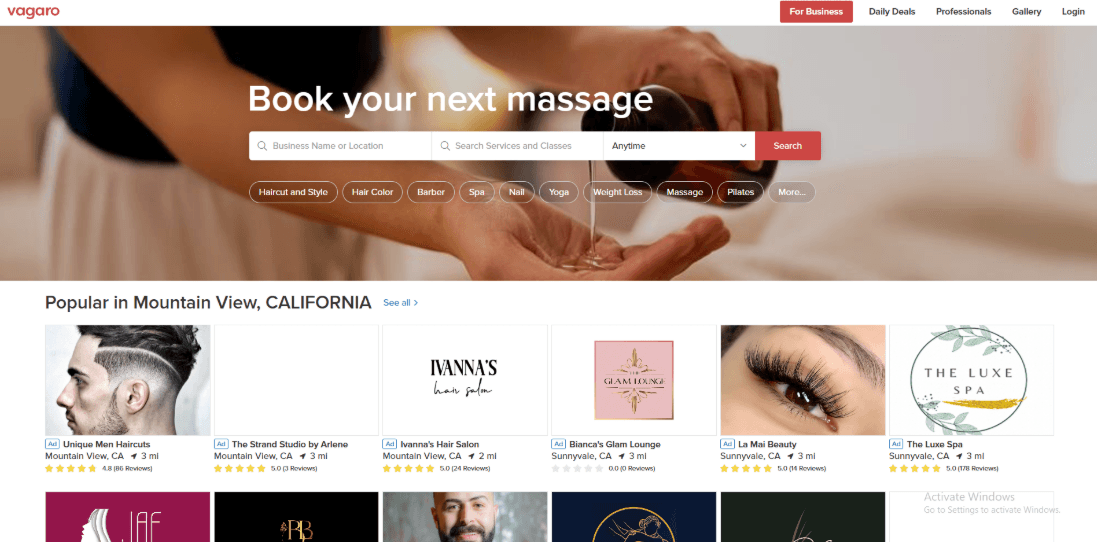
Vagaro is known as an all-in-one tool for salons, spas, and fitness businesses. It handles scheduling, payments, and even gives you a built-in website. If you are exploring Booksy Alternatives and want more control over your own website and booking flow, Vagaro is usually one of the first tools to look at.
- Client booking flow
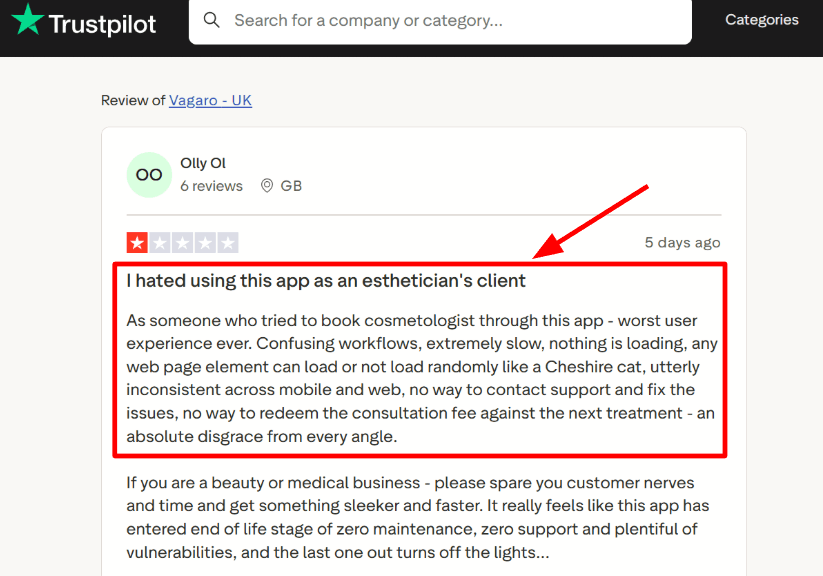
When I tested the booking experience from a customer’s side, it worked well but started to feel a bit crowded once many services and add-ons were added. The experience depends a lot on how you set things up. A simple setup feels smooth. A complex setup can feel heavy. I also saw a similar complaint in a Trustpilot review (screenshot below) about slow, inconsistent loading across web and mobile, so I’m calling that out early. Compared to Booksy, this is less about a single marketplace profile and more about how cleanly you configure your own booking surfaces.
- Availability controls
Vagaro lets you manage availability in a detailed way. You can set bookable calendars instead of just open hours. I used personal tasks to block time, and it worked well once everything was set up. It did take a bit of time to find certain settings, like turning off online booking for specific time blocks without affecting recurring schedules.
- Payment integration
You can accept card payments, take deposits, and store cards on file. It also allows charging cancellation or no-show fees when needed. This is useful if you sell services, memberships, or products. Everything stays connected to the booking, which keeps things organized.
- MySite builder
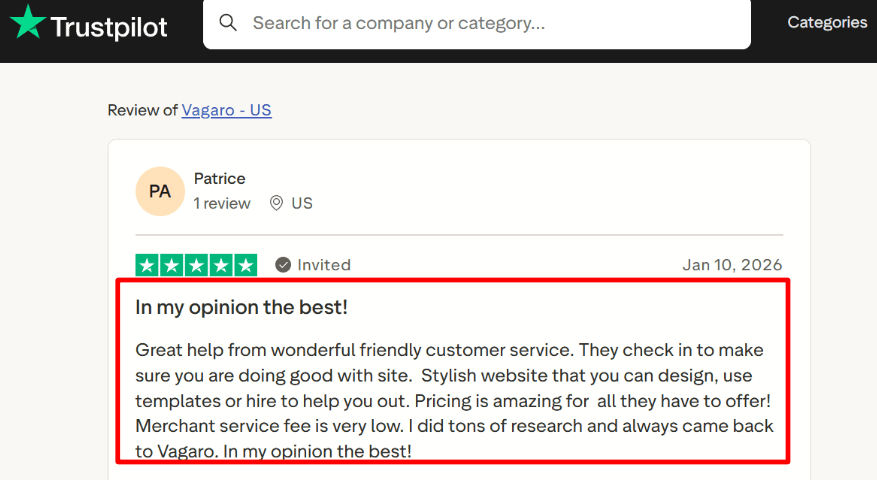
Vagaro’s MySite is a drag-and-drop booking website builder that stays in sync with your account updates. A Trustpilot review I read (screenshot below) praised the templates and the helpful customer service, and that matches what I saw during setup. This is where Vagaro can feel more “brandable” than Booksy if your bookings come from Instagram, Google, or your own site.
- Marketplace growth knobs
Vagaro also has its own marketplace features like getting featured for more visibility. You can choose whether to use these or focus only on your own channels. For people comparing Booksy Alternatives, this matters because some tools depend heavily on marketplace traffic, while others give you more independence. Most comparison posts skip company-level context, but it’s worth noting Booksy has had ownership changes in motion, per a Verdane release mentioning Booksy in its portfolio transaction. I don’t treat that as good or bad, but it can affect roadmap expectations when you’re switching.
For patient bookings, reminders, and intake-friendly flows, see medical appointment scheduling software.
Pros
- Flexible scaling via bookable calendars and add-ons, which can land cheaper than Booksy’s per-extra-user model for some setups.
- Strong website and template options via MySite.
- Lots of operational tooling in one place once configured.
- Marketplace discoverability is optional, not forced.
- Good fit for multi-location businesses that share customer data.
Cons
- If you want a single flat plan where most things are included, Booksy is simpler and usually less “add-on math.” Vagaro’s model rewards picking modules, but it’s not ideal if you hate configuration.
- Customer booking UX can feel heavy if you over-configure services and flows.
- Some useful features show up as paid add-ons, so scope creep is real.
- Online and card-on-file fees can surprise people; see Vagaro’s explanation of keyed-in rates in Vagaro Support.
Source: Vagaro Support. - If Booksy’s marketplace demand is a major lead source in your area, switching away can reduce discovery until your own channels catch up.
Pricing
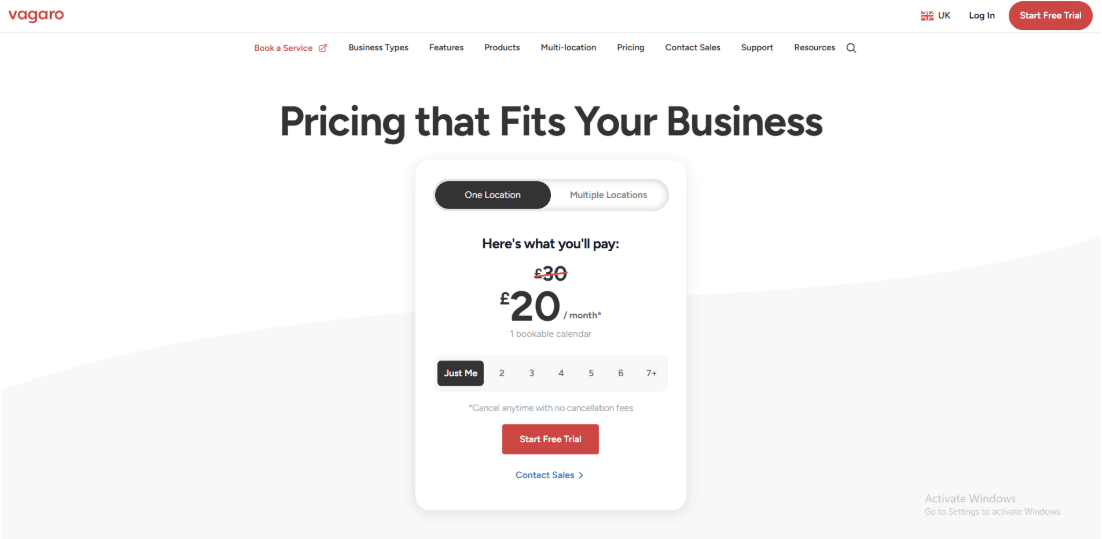
- Base pricing starts around $23.99/month for 1 bookable calendar, with a 30-day trial (some features excluded during trial).
- Costs rise as you add more bookable calendars and optional add-ons like Forms or MySite.
- The cleanest source to quote is the official Vagaro pricing.
When to Choose Vagaro
Choose Vagaro if you need website-first booking, multi-location operations, and you’re happy to pay for specific add-ons instead of a single bundled plan. Choose Booksy if your growth relies on the marketplace + Boost loop, or you prefer an all-features-included subscription with fewer configuration decisions. If Booksy is close to what you need, these Booksy alternative options are worth comparing. If you run clinics or privacy-sensitive workflows, Vagaro’s HIPAA-related notification controls can matter, but only if you actually configure them. For solo pros, the deciding factor is usually simple: where do your bookings come from most days, marketplace or your own channels?
Fresha
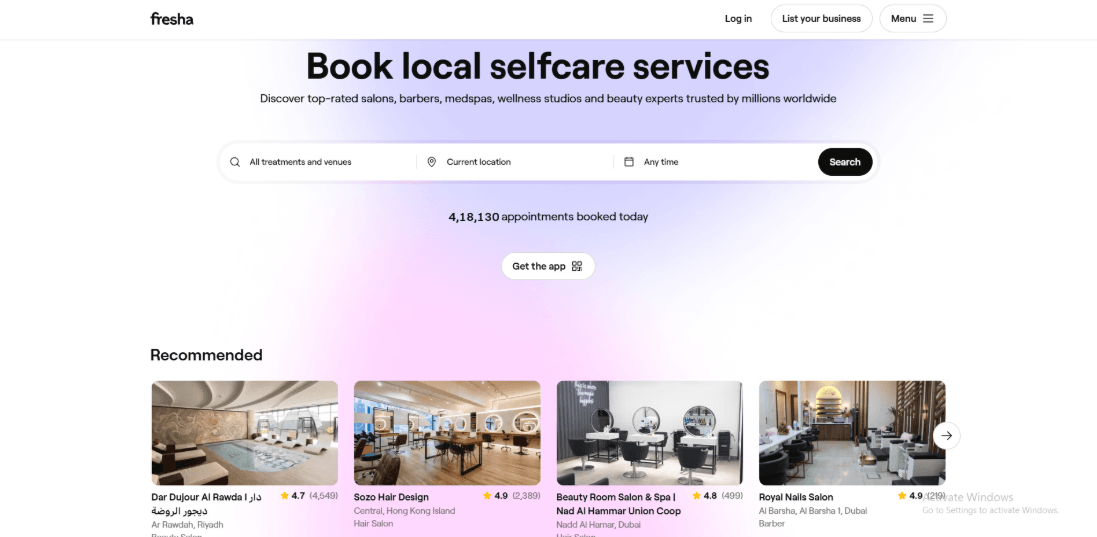
Fresha is known as a booking and payment system built for salons, spas, and wellness businesses. It also has a marketplace where clients can discover and book services. When people look at Booksy Alternatives, Fresha often comes up because it brings bookings, payments, and client management into one place. It feels closer to a full front desk system than a simple scheduling tool. If you’re weighing Fresha against other systems, my Fresha alternative page has a tighter side-by-side.
- Team-based pricing
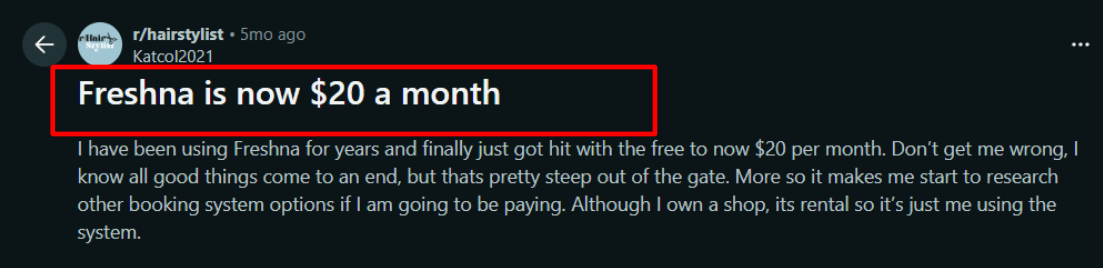
Fresha charges based on how many team members can take bookings. Your cost goes up or down depending on how many people are active on your calendar. While testing, this reminded me of a Reddit post where a solo renter shop got moved from “free” to roughly $20/month and started shopping around (screenshot below). Booksy is more “set plan + add seats”, so the pricing mental model feels different.
- Live support paths
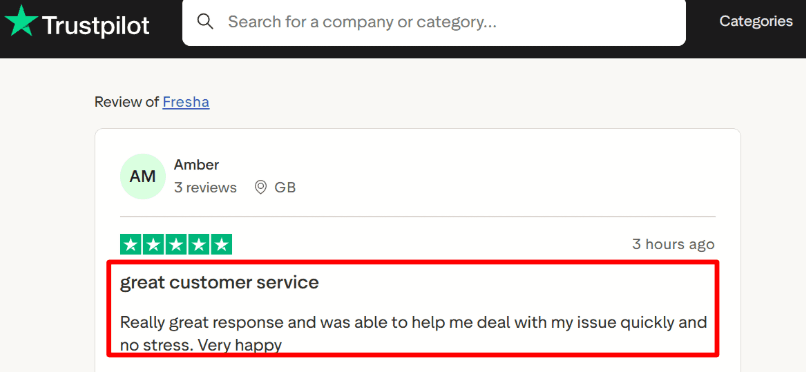
Fresha clearly shows what kind of support you get at each level. Basic plans include email support, while higher plans add chat and phone options. I also saw a Trustpilot note praising fast, low-drama help from support (sharing a screenshot below), and that matches what I saw when I poked around setup. If you’ve had slow back-and-forth on other tools, this can matter day one.
- Messaging with allowances
Fresha includes automated reminders for clients. There are free monthly limits for messages, and after that you pay based on usage. This is easy to overlook at the start. It only becomes noticeable when your booking volume increases. If your business depends on reminders to reduce no-shows, it is worth checking how much messaging you actually send each month.
- Payment integration
Fresha Payments is tightly integrated: you can take online or in-person payments, reduce no-shows with deposits, and track revenue in one place. The “business wallet” concept is useful when you want cleaner reconciliation without stitching together separate tools. If you’re currently happy with Booksy’s payments stack, switch only if you actually need the extra POS-style depth.
- Compliance signals
Fresha shares details about its security standards, including GDPR and ISO 27001. It also mentions HIPAA in certain contexts. If your business handles sensitive client information, this is something to review carefully. It is always a good idea to double check the latest details before relying on it.
If Fresha is part of your salon stack, this Fresha alternative guide can save you time.
Pros
- Cleaner “all-in-one” ops setup for a small studio. Booking, POS, packages, and client records live together, so you’re not duct-taping tools. This can reduce the admin load compared to a lighter Booksy setup.
- Strong marketplace + direct booking link approach.
- Packages and memberships are first-class features.
- Clear plan scaling as you add bookable staff.
- Publicly stated security/compliance signals for regulated workflows.
Cons
- If Booksy is driving most of your discovery and repeat flow today, switching to Fresha can be a risky reset for visibility and client habit. In that case, I’d only switch if the operational gains outweigh the churn risk.
- Messaging costs can creep up once you pass free allowances.
- Marketplace acquisition has a one-time fee for new clients sourced via the marketplace.
- Some features sit behind optional add-ons, so your “real” price can expand.
- If you ever cancel your plan, your marketplace profile gets unlisted and reviews stop showing until you reactivate (details in Fresha’s own help doc).
Pricing
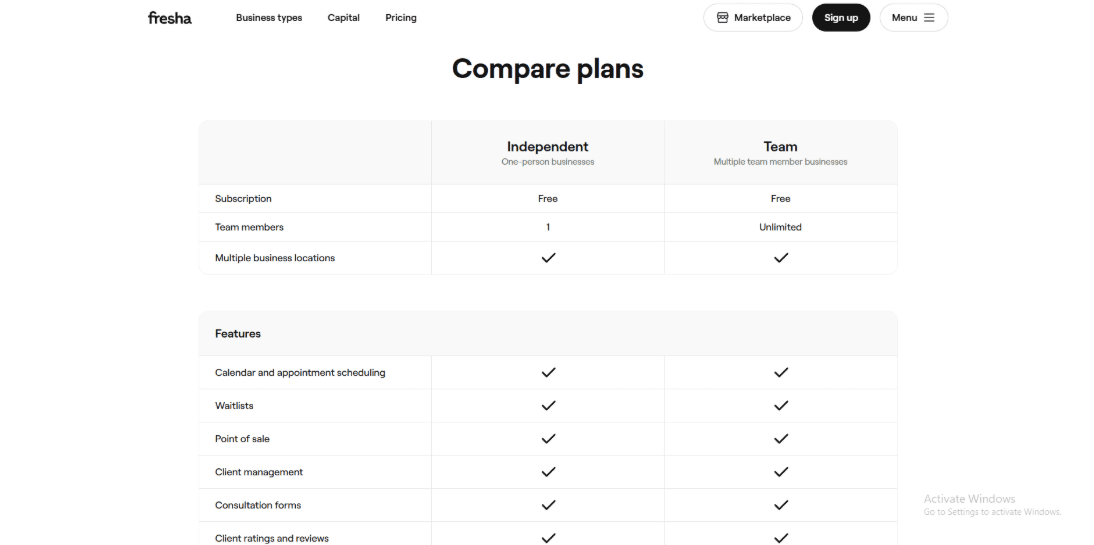
- Fresha uses a monthly subscription model that scales by bookable team members, with a 14-day trial available in many regions.
- Communication includes monthly free allowances, then per-message fees for texts/WhatsApp and per-email fees once you exceed limits.
- Marketplace discovery can trigger a one-time fee for brand-new clients who find you via the marketplace. See the latest numbers here: Fresha pricing page.
Source: Fresha pricing.
When to Choose Fresha
If you want POS + packages + memberships to feel native and not bolted on, Fresha is usually the better fit. If your business is growing and you need pricing that scales with bookable staff, Fresha’s model is straightforward. If Booksy is already your main acquisition channel and your team relies on that ecosystem daily, stay on Booksy unless the ops pain is real and measurable. When Fresha pricing or limits come up, I usually point people to Fresha alternative.
Square Appointments
Features
Square Appointments is popularly known for being a scheduling tool that’s tightly connected to Square’s POS and payments. If you already run on Square, it can be a simpler setup than Booksy, and it even starts with a free plan while Booksy is typically paid. If Square is only one of a few options, the Square Appointments alternative breakdown can help you sanity-check the switch.
- Payment integration
I tested checkout flows and it’s very “one login” if you already use Square for card processing and payouts. This is the big difference vs Booksy, where payments exist, but the product identity is still beauty marketplace first and commerce second.
- Booking site links
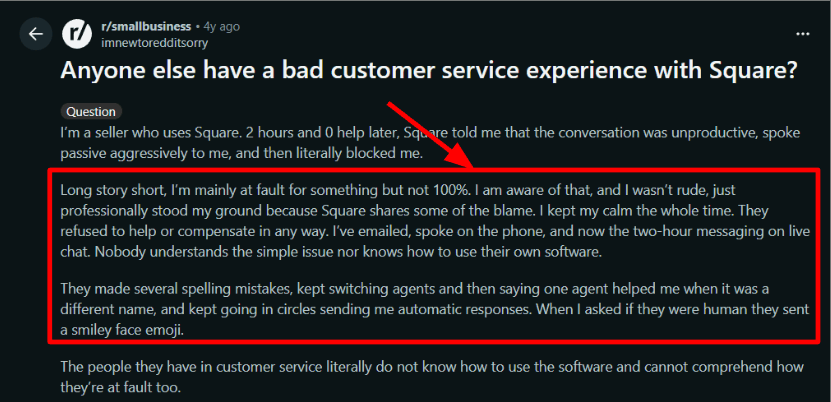
You get an online booking site and integrations, so clients can book 24/7 from your website and shareable links. While setting this up, I kept thinking how it’s the opposite of Booksy’s marketplace-first discovery model. Also, I saw a detailed Reddit review where a seller described chat support going in circles and ending with them being blocked, screenshot below, and it matches the risk of being deeply tied to one account.
- Availability rules
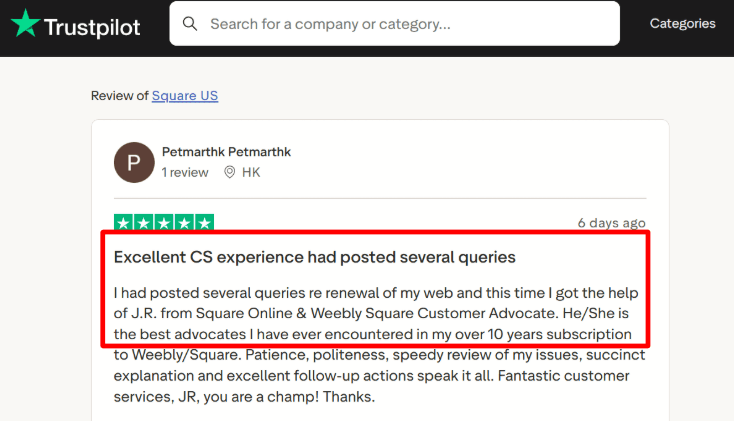
Staff calendars and availability live in one place, and clients can book by service, location, and provider. In my test, some settings took longer to locate than I expected because they sit across a few dashboard areas. I also saw a Trustpilot review praising a Square advocate for patient follow-up, screenshot below, which lines up with the “when support is good, it’s really good” pattern.
- Waitlist and resources
Waitlists and resource-style scheduling are available, which helps if you run rooms, chairs, or stations. This is where Square can feel more operational than Booksy if you do more than pure appointments. One detail I rarely see people mention when comparing with Booksy is the company-level shift around it, like the VNV Global Q1 2024 report noting its agreement to exit its Booksy stake to Verdane. Source: VNV Q1 report.
- Meeting tool integration
If you sell remote sessions, Square has a Zoom-style “virtual appointment” path through the Square App Marketplace. It’s not as plug-and-play as a dedicated video-first scheduler, but it works when your payments and invoicing are already on Square.
If Square Appointments is on your shortlist, my Square Appointments alternative page is a good reference.
Pros
- Free plan exists for solo operators, and the POS plus scheduling flow is straightforward if you already use Square. That can be a clean starting point compared to Booksy’s paid base subscription.
- Strong end-to-end payments workflow.
- Solid for multi-location operations.
- Useful operational tools like waitlists and resource handling.
- Easy to keep invoices and customer history in one place.
Cons
- If you rely on Booksy to bring you new clients via its beauty marketplace, Square won’t replace that discovery channel. In that specific scenario, Booksy can simply win on demand generation.
- Per-location monthly fees can scale quickly as you add locations and staff.
- Some add-ons and limits are plan-dependent, like SMS marketing details on the Square pricing.
- You’re more locked into the Square ecosystem for payments and workflows.
- I had to dig through settings more than I expected during setup.
Pricing
- Free plan: $0 per location, no monthly subscription, you pay processing fees.
- Plus: $49 per month per location, includes a 30-day trial.
- Premium: $149 per month per location, includes a 30-day trial and the lowest processing fees.
- Processing examples: in-person card-present rates vary by plan, and online payments also vary. See details on the official Square pricing.
When to Choose Square Appointments
If you want POS + scheduling + payments in one system, Square Appointments is the cleaner choice. If you are a solo operator and want a free starting point, Square is easier to justify early. If your growth depends on marketplace discovery for beauty services, Booksy is usually the better fit. If you want to run multi-location operations with resources, Square tends to feel more “ops-first”. If you want tools similar to Square Appointments, see Square Appointments alternative.
Mindbody
Mindbody is best known for running serious fitness and wellness businesses: classes, memberships, staff, payments, and marketing in one system. I’d pick it as a Booksy alternative when you have multiple schedules to manage classes plus appointments and you want deeper operations, not just a clean booking link.
- Calendar integration
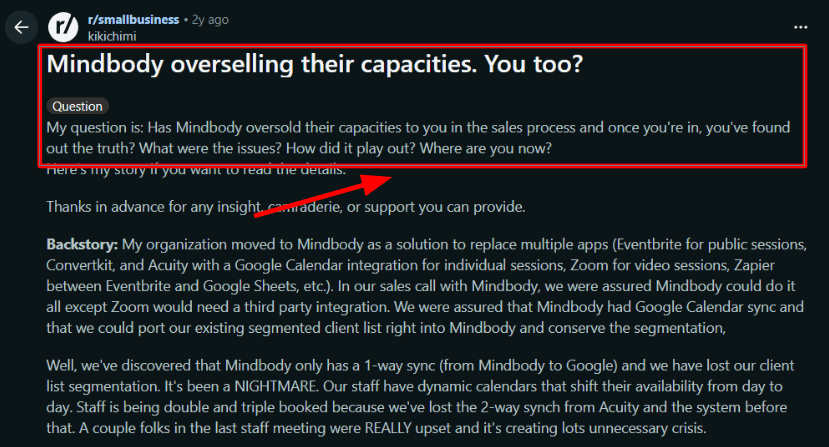
I tested the Google Calendar setup, and it’s easy to turn on, but it’s not a true two-way setup for teams. Mindbody’s own docs note the integration is one-way from Mindbody to Google Calendar (and then to Outlook), which matches what I saw during setup. I also saw a Reddit thread saying this exact gap led to double and triple bookings after switching from Acuity, and I’m sharing that screenshot below.
- Client booking experience
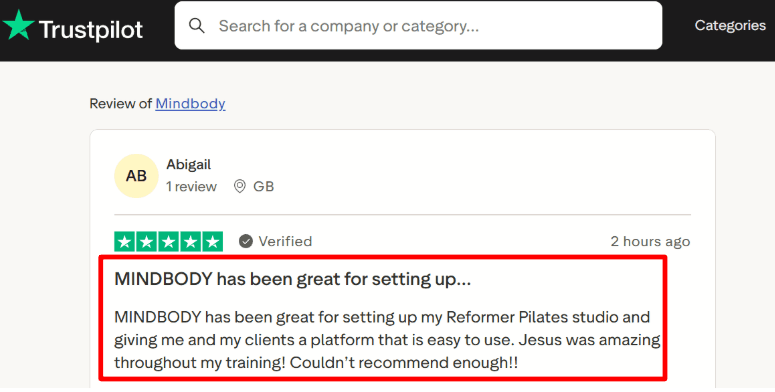
The booking widgets and client-facing flow feel polished, and the Mindbody app listing is a real distribution channel for certain categories. A Trustpilot review I saw also called out how smooth onboarding felt for a Pilates studio (trainer support, simple platform), so I’m adding that screenshot below too. If your clients book recurring classes, this experience matters more than it sounds on day one.
- Payments and POS
Payments are built into the platform, with POS and “fraud detection” positioned as part of the stack. Compared to Booksy’s simpler beauty-first setup and transparent base plan ($29.99/month, plus $20 per extra team member). One small annoyance: higher-tier pricing is not fully transparent on the site and it pushes you into a sales flow.
- Discovery marketplace
Mindbody leans into discovery via the Mindbody consumer app network (the pricing page highlights access to 2.8M+ monthly shoppers). Booksy is also marketplace-driven at scale. CIBC Innovation Banking describes Booksy as powering “hundreds of millions of appointments each year”, which hints at how central marketplace demand is to their model. If new-client acquisition is a priority, this channel difference is worth weighing, not just features.
- Automation and growth ops
On higher tiers, Mindbody adds email and SMS marketing, automated campaigns, a built-in sales pipeline, and deeper analytics: Mindbody pricing. If you’re used to Booksy being mostly scheduling, payments, and marketplace presence, this feels like a broader operating system. There’s also a big integrations ecosystem for edge cases like Zoom-style virtual workflows via partners like ZoomConnect. If Mindbody is part of your evaluation, check this Mindbody alternative breakdown.
Pros
- Unlimited users per location, so teams scale without extra logins.
- Booksy adds $20/month per additional team member, so larger teams feel it faster.
- Strong fit for classes plus appointments in one calendar.
- Resource management and pick-a-spot style booking for studios.
- Built-in marketing and lead tools if you actually use them.
- Broad integrations ecosystem for specialist workflows.
Cons
- If you’re a solo barber, nail tech, or small salon that just wants predictable pricing and fast setup, Booksy is usually the cleaner pick.
- Mindbody starts at $99/location/month and can be heavier than you need.
- Calendar sync is not truly two-way for teams, and Mindbody documentation notes it’s one-way from Mindbody to Google.
- Virtual classes with Zoom often rely on third-party partners rather than native Zoom-first setup.
- Higher tier pricing is not fully self-serve, and some features vary by region.
- Data migration and segmentation can get messy in real life, based on what I saw teams report after switching.
Pricing
- Starter starts at $99 USD/month per location on the official pricing page (booking, payments, widgets, app listing, basic reporting): Mindbody pricing
- Accelerate and Ultimate add advanced scheduling, resource management, analytics, and email/SMS marketing, but the site routes you to sales for exact pricing.
- Unlimited users are included per location, and some features vary by region.
When to Choose Mindbody
If you run classes plus appointments and need studio-grade operations (resources, analytics, marketing), choose Mindbody. If your team is growing and you want unlimited staff logins per location, Mindbody is usually a better fit than Booksy’s per-seat add-on pricing. If you want simpler options than Mindbody, see Mindbody alternative. If you want simple pricing and a beauty-first workflow, or your staff lives inside Google Calendar and expects true two-way syncing, stick with Booksy.
Which Booksy alternative should you choose
If you want a fast answer, the right choice comes down to how you get clients and how you run operations.
- Choose Lunacal if your bookings come from your own channels and you want high-converting, branded booking pages with payments built in.
- Choose Vagaro if you need a flexible salon system with staff scheduling, add-ons, and a built-in website.
- Choose Fresha if marketplace discovery is important and you want clients to find you without heavy marketing.
- Choose Square Appointments if you already use Square and want payments, POS, and scheduling in one system.
- Choose Mindbody if you run a fitness or wellness studio with memberships, recurring classes, and deeper operational needs.
From testing, the biggest decision factors are where your demand comes from (marketplace vs your own traffic), how complex your scheduling is (appointments vs classes), and whether you need POS or membership billing built in. These matter more than surface-level features and will usually decide which tool actually works long term.
Methodology
For this 2026 review, each Booksy alternative was evaluated through documentation checks and hands-on testing, then scored using a consistent checklist.
Sources
- Reviewed official sites, pricing pages, release notes, FAQs, and help docs to capture setup steps, limits, and policies.
- Checked Trustpilot, G2, Capterra, Reddit, and Quora for recurring feedback, then validated patterns during trials when possible.
- Looked for evidence of ongoing product support, clear incident communication, and updated training materials.
Test setup for Booksy-style workflow
- Built a sample salon with three services, two staff members, buffers, deposits, and cancellation rules. Connected email, SMS, and Google Calendar sync.
- Placed bookings as a new client using a separate profile, then assessed speed and clarity on mobile and desktop.
- Triggered reminders, reschedules, and cancellations to confirm templates, timing, and calendar conflict handling.
Common scenarios we tested
- Booking, rescheduling, cancellations, waitlist, and no-show handling. Measured reminder timing and follow-up behavior across time zones.
- Payments, tips, refunds, receipts, reporting, staff roles, multi-location support, exports, and core integrations for POS and marketing.
- Admin controls, permissions, and basic privacy settings, including data export and account deletion paths in the product UI.
FAQs
Which is the best Booksy alternative?
The best Booksy alternative is Lunacal. It keeps booking simple while giving you packages, customizable intake forms, team scheduling, and security with GDPR controls. It is also one of the highest rated on G2 at 4.9/5. If you already run payments in Square, Square Appointments can fit better.
Compare Booksy booking software competitors
The most common Booksy booking software competitors people compare are Lunacal, Vagaro, and Fresha.
- Lunacal: best when you care about the booking page experience, capturing the right intake details, and running team scheduling cleanly.
- Vagaro: best for salons and spas that want strong staff management, services, and day to day operations in one place.
- Fresha: best when you want a salon focused setup that also supports client discovery and repeat bookings.
If your business already lives inside Square for payments and POS, Square Appointments is usually the smoothest transition.
What country level payment and localization nuances apply to Booksy alternatives?
Country nuances in Booksy alternatives usually show up in payments, taxes, and language. For US, UK, Canada, Australia and EU teams, these checks save headaches.
- Payments: confirm Apple Pay and Google Pay, plus how refunds and chargebacks show in reports.
- EU: verify GDPR settings, data export, and consent text for forms.
- Language: for German, French, and Spanish clients, test the flow, emails, reminders, and checkout errors.
What features should a strong Booksy alternative include?
A strong Booksy alternative should include fast self booking, deposits or full prepay, clear cancellation rules, automated reminders, staff availability controls, client history notes, and simple rescheduling. For teams, add shared calendars, assignment rules, and daily reporting you can trust.
How do I switch from Booksy without losing clients?
To switch from Booksy without losing clients, export client list, recreate services and policies, run links parallel for two weeks, then move reminders to Lunacal, Vagaro, Fresha, or Square Appointments.
Summarize this content with AI